A practical 60-minute setup guide that puts the 50/30/20 budget on autopilot — open the right accounts, automate transfers, sort spending, and review monthly.
Most budgets do not fail because people lack willpower. They fail because the setup was never finished. Someone reads a great article on Sunday, opens a spreadsheet, fills in a few rows, and by Wednesday the spreadsheet is closed and life takes over.
The 50/30/20 rule sidesteps this by asking you to make a handful of structural decisions once, then stepping out of your way. After about an hour of setup, your paycheck splits itself, your savings transfers happen on a schedule, and the only number you actively watch is one — the wants bucket.
This article is the setup guide, not the philosophy. The "why" lives in the companion guide. This is the procedural how-to: what to open, what to move, what to sort, and how to keep it running with about ten minutes a week. By the end, your household will not have to "decide to budget" again.
Before You Start: What You'll Need
Block out roughly 60 uninterrupted minutes — one Sunday morning is enough. Setup gets harder if you have to stop and restart, because half the value is seeing all your numbers in one sitting.
Gather these before you begin:
- The last three months of bank and credit card statements (PDF or CSV)
- A complete list of your accounts: checking, savings, credit cards, retirement, brokerage
- Your most recent two or three pay stubs
- A calculator, a spreadsheet, or our budget calculator
- A scratch pad — paper is fine — for the worked numbers
You do not need a finance app, a subscription, or a coach to do this. You need an hour, your statements, and a willingness to look at numbers you may have been avoiding. That is the whole prerequisite.
Step 1: Find Your Real Take-Home Pay
The first number that matters is what actually hits your checking account each pay period — not the salary on your offer letter, not the gross pay at the top of your pay stub. Use net pay, after federal tax, state tax, FICA, health insurance, and any pre-tax 401(k) contribution.
If you are salaried with steady deposits, take a single monthly deposit at face value. If you are paid bi-weekly, multiply one biweekly deposit by 26 and divide by 12 to get a monthly average.
If your income includes commission, tips, freelance invoices, or quarterly bonuses, average the last three months of net deposits. Do not budget against your best month — budget against your typical month, then treat anything above that as bonus savings.
One subtle point: pre-tax 401(k) contributions are already removed from your net pay. That is correct. They count separately inside the 20% savings bucket — we will revisit this in Step 2. For now, the only number you need is the dollar amount that lands in checking each month.
Write that number at the top of your scratch pad. Call it "monthly take-home." Everything else flows from here.
Step 2: Compute Your Target Bucket Sizes
Now multiply your monthly take-home by 0.50, 0.30, and 0.20. Those three numbers are your starting targets.
Example: a household with $5,200 in monthly take-home pay would land here:
| Bucket | Percent | Monthly target |
|---|---|---|
| Needs | 50% | $2,600 |
| Wants | 30% | $1,560 |
| Savings | 20% | $1,040 |
Those targets are guidelines, not commandments. If you live in a high cost-of-living city — San Francisco, New York, Boston, Seattle, parts of D.C. — a 50% needs bucket may be mathematically impossible. Rent alone could be 45% of take-home. That is fine. The framework still works; the ratios shift. A more realistic starting point in a high-COL city might be 60/25/15 or even 65/20/15, with the explicit plan to move back toward 50/30/20 as income grows or housing costs ease.
What you should not do is quietly relabel wants as needs to make the math work. If your gym membership, your streaming bundle, and your dining out fit comfortably inside a smaller wants bucket, great. If they do not, that is a signal — not a reason to redefine the rule. Our budget calculator will compute these targets for any take-home amount and let you compare against actual spending in the next step.
Write all three target dollar amounts on your scratch pad under the take-home number. They are your benchmark for everything that follows.
Step 3: Sort 60 Days of Transactions
This is the longest step and the one most people skip. Do not skip it. You cannot fix a spending pattern you have not looked at.
Log in to each bank and credit card account and export the last 60 days of transactions as CSV. Almost every major bank supports CSV export under "statements" or "transactions." If yours does not, copy the rows into a spreadsheet manually — it is tedious but only takes about 20 minutes.
Combine everything into one sheet with four columns: date, description, amount, bucket. You will fill the bucket column for every transaction using this rule: would I cut this expense immediately if I lost my income tomorrow?
- If yes — it goes in wants.
- If no, but it is keeping me alive, housed, working, or solvent — it goes in needs.
- If it grows my net worth — it goes in savings.
That is the entire rule. Most transactions sort themselves in under a second. For the ambiguous cases, this table covers about 90% of what trips people up:
| Expense | Bucket |
|---|---|
| Rent or mortgage payment | Need |
| Streaming subscriptions | Want |
| Minimum credit card payment | Need |
| Extra credit card payment (above minimum) | Savings |
| Post-tax 401(k) or IRA contribution | Savings |
| Restaurants and takeout | Want |
| Groceries | Need |
| Gym membership | Want |
| Utilities and internet | Need |
| Phone bill (basic plan) | Need |
| Premium phone upgrade payments | Want |
| Health insurance premium | Need |
| Car insurance and gas (for work commute) | Need |
| Coffee shops | Want |
| Charitable giving | Want (some budgeters treat as need) |
Two things tend to surprise people. First, the minimum credit card payment is a need — failing it damages your credit and triggers late fees, the opposite of solvency. Anything paid above the minimum is debt paydown, which builds your balance sheet — that is savings. Second, the morning coffee and the gym membership are not character flaws — they are wants. The rule is descriptive, not judgmental.
Tag every transaction. By the end you should have a clean CSV with a bucket label on every row.
Step 4: Compare Reality to Targets
Total each bucket and compare to the targets from Step 2.
Almost everyone finds the same pattern on the first run: needs are close to target (often 45–55%), wants are heavier than expected (35–45%), and savings is lighter than hoped (5–15% rather than 20%). That is normal — the gap between intention and reality is exactly what a budget is designed to surface.
Write your three actual percentages next to your three targets. The largest gap is your single biggest piece of work for the next 90 days.
If wants is 40% and savings is 10%, the answer is not "cut wants in half tomorrow." The answer is to shift roughly $260/month of a $5,200 take-home — five percentage points — from wants into savings over the next two to three months. One fewer restaurant dinner per week, or one canceled subscription, or one delayed Amazon purchase. Small, durable shifts beat heroic ones every time.
If needs is genuinely above 50% with no slack — rent is rent, insurance is insurance — your levers are different: increase income, refinance debt, or move toward cheaper housing on your next lease cycle. None of those happen this Sunday, but knowing the number tells you what to work on. Our budget calculator will do the comparison math for you.
Step 5: Open the Right Accounts
A budget that lives in one checking account is fragile. The 50/30/20 system gets dramatically easier when each bucket has its own home. Here is the minimum account architecture:
| Account | Purpose | Where it lives |
|---|---|---|
| Checking | Bills + variable spending (needs + wants) | Your current bank |
| High-yield savings (HYSA) | Emergency fund + sinking funds | Online bank |
| Roth or Traditional IRA | Long-term retirement | Major brokerage |
| 401(k) | Pre-tax retirement, employer match | Through employer |
| Brokerage (taxable) | Long-term investing beyond IRA | Major brokerage |
Most people already have the checking account and the 401(k). The missing piece for most first-time budgeters is a real high-yield savings account at an online bank — separate from checking, with a meaningfully higher interest rate.
Well-known HYSA providers include Ally, Marcus by Goldman Sachs, Capital One 360, SoFi, and Wealthfront. Rates change constantly; these are not endorsements — pick one based on current rate, ease of opening, and whether it links cleanly to your existing checking. The key feature is not the rate; it is the 1–2 business-day transfer delay, which adds friction to impulse withdrawals.
If you do not have an IRA yet and your 401(k) match is already captured, opening one at a major brokerage takes about 15 minutes online. For personalized advice, a fee-only CFP via letsmakeaplan.org is the right call. Open whatever accounts you are missing today; funding them comes in the next step.
Step 6: Automate the Savings Transfers
This is the step that makes 50/30/20 actually work. Skip it and the system collapses; complete it and the system runs without you.
The principle: pay savings first, automatically, on the day after payday — before you have a chance to spend it.
There are two clean ways to set this up:
-
Split direct deposit at the employer level. Many payroll systems let you route a percentage or fixed dollar amount of each paycheck to a second account. Set 80% to checking and 20% to your HYSA. The money never touches the spending account.
-
Scheduled bank transfer the day after payday. If your employer does not support a split, create a recurring automatic transfer from checking to HYSA, dated one or two days after your paycheck arrives. Set the same kind of recurring transfer to your IRA or brokerage for any portion going to long-term investing.
For a $5,200 take-home with a $1,040 savings target, that might split as $600 into HYSA, $300 into a Roth IRA, and $140 into a taxable brokerage. The exact ratios are personal — what matters is that the total $1,040 leaves checking automatically every month.
After this is in place, the budget is largely on autopilot. You no longer "save what is left." Savings is the first line item, and what is left in checking is your needs + wants budget by definition. Use our savings goal calculator to size each transfer against a specific target.
Step 7: Track Just One Number Weekly
Once savings is automated and your fixed bills (rent, utilities, insurance, minimum debt payments) are on autopay, the only category left that actually varies week to week is wants. That is the only number worth tracking weekly.
Most major banks now categorize transactions automatically and show a running monthly total for restaurants, entertainment, shopping, and similar. Open the app once a week — Sunday morning, before the next week starts — and check one number: how much of your wants bucket has been spent so far this month.
That is the entire weekly review. Ten minutes, one number.
Resist the urge to build a 20-category tracker. The reason 50/30/20 works for so many households is exactly because it collapses dozens of small decisions into three buckets. A spreadsheet with 27 categories will be abandoned by month two; a single number checked weekly will still be running in year three.
If your bank does not categorize automatically, a free app like Empower (formerly Personal Capital) or Monarch can do it for you. Or, simpler: just look at your credit card statement, since for most households 70–80% of wants spending lives there.
Step 8: Review and Adjust Monthly
At the end of each month, ask three questions in this order:
- Did wants stay under budget? If yes, the system is working — change nothing.
- If wants was over, what was the single biggest subcategory?
- By how much would I need to reduce that one subcategory next month to land in range?
If wants ran $1,820 against a $1,560 target — $260 over — and dining out accounted for $640 of that, the answer is not "stop eating out." The answer is to reduce dining out by roughly 25% next month, not 100%. A $480 dining target is achievable and durable. A $0 dining target is a heroic plan that breaks by week two and triggers the all-or-nothing rebound that kills budgets.
Sustainable adjustments beat heroic ones every single time. Aim to close the gap by a quarter to a third each month, not all at once.
What to Do If Wants Keeps Blowing Up
If wants consistently exceeds target for three months in a row, the issue is structural, not motivational. Three tactics that work, in order of how much friction they add:
-
The 24-hour rule for non-essentials over $50. Before any discretionary purchase above $50, wait 24 hours. About half of impulse purchases do not survive the wait. This single rule routinely cuts wants spending by 10–20% with zero spreadsheet work.
-
Freeze the credit cards if utilization is the issue. If most overspending lives on cards, remove them from your phone wallet, take them out of your physical wallet, and switch to a debit card for daily spending. The marginal friction of having to go get the card kills most impulse spending.
-
Audit subscriptions. Pull your last 90 days of statements and list every recurring charge under $30. Streaming, apps, cloud storage, fitness, news, software. The typical American household carries $40–$120 per month in subscriptions that nobody actually uses. Cancel anything you have not used in 30 days. You can always re-subscribe.
If you have done all three and wants still runs over, the issue may be that your targets were unrealistic for your stage of life or your city — recompute against a 60/25/15 split for three months and reassess.
Common Setup Mistakes
A short list of what to avoid:
- Using gross pay instead of net — inflates every bucket by 20–30%
- Tracking too many categories — anything beyond 8 categories will be abandoned
- Skipping the automation step in Step 6 — without it, the system relies on willpower
- Not opening a separate savings account — money in checking gets spent
- Overcounting irregular expenses as "needs" — annual car registration is real, but most "needs creep" is rebranding
- Including the 401(k) employer match in your personal 20% savings rate — that is bonus, not your contribution
- Building the perfect spreadsheet nobody runs — done is better than elegant
- Setting an unrealistic savings target in month one — start where you are, ratchet up quarterly
Frequently Asked Questions
Should I use gross or net income? Always net. Gross pay is a number that pays your employer's bookkeeper, not you. Use what hits your checking account after taxes and pre-tax deductions.
What if 50% needs is not realistic in my city? Then 50/30/20 is a target, not a starting point. Compute a realistic split for your situation — often 60/25/15 in high-COL areas — and treat 50/30/20 as the multi-year direction of travel as your income grows.
Do I include mortgage principal in savings? The mortgage payment itself is a need (housing). The principal portion does build equity, but for simplicity and consistency, count the entire monthly mortgage payment in needs. Extra principal payments above the regular schedule are savings.
Can I use 50/30/20 if my income varies month to month? Yes. Average the last three to six months of net deposits and budget against the average. In high-income months, the surplus goes directly to a buffer in HYSA. In low-income months, you draw from that buffer to maintain steady spending. Variable income makes the buffer more important, not less.
How long until the system feels automatic? Roughly 60–90 days. The first month is awkward — you are still catching transactions in the wrong bucket and adjusting targets. By month three, the automation is doing the work and the weekly check takes ten minutes.
Should I use an app or a spreadsheet? Whichever you will actually open. If you already love spreadsheets, a four-tab Google Sheet is plenty. If you do not, use your bank's built-in categorization plus our budget calculator once a month. The best tool is the one you keep using in month six.
Next Steps
This Sunday — not "soon," not "next month" — do these three things in order:
- Open the budget calculator and plug in your monthly take-home to see your three bucket targets in dollars.
- Open or fund a high-yield savings account, and use the emergency fund calculator to size your starter target.
- Set up the automatic transfer in Step 6, even if you start at 10% rather than 20% — automation matters more than the percentage.
For the deeper why — the history of the rule, where the ratios came from, and the trade-offs versus other budgeting methods — read the companion 50/30/20 budget rule guide. And once a specific savings goal comes into focus, the savings goal calculator will tell you exactly how much to route per paycheck to hit it on time.
The system works. The setup is the hard part. One hour today, ten minutes a week after that.
Run the numbers
Everything below came out of this site's own Budget Calculator (50/30/20). The figures are not quoted from anywhere else: each row is one run of the same calculation the tool page performs, using August 2026 rules. Put the same inputs in and you will get the same output.
How the result moves with income
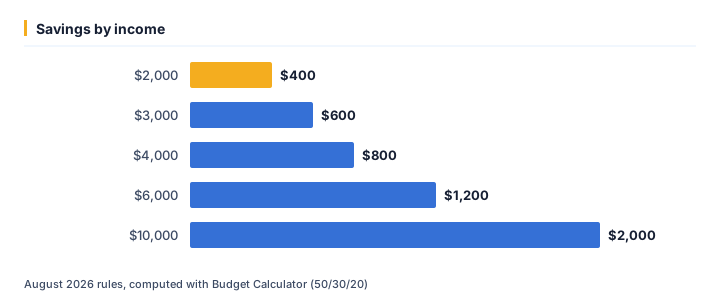
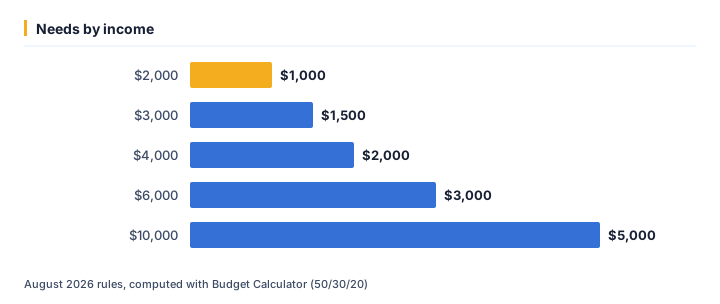
We ran 5 values of income through the calculator and left every other input at its default. As of August 2026, the output was:
| Income ($) | Savings ($) | Needs ($) | Wants ($) |
|---|---|---|---|
| 2,000 | 400 | 1,000 | 600 |
| 3,000 | 600 | 1,500 | 900 |
| 4,000 | 800 | 2,000 | 1,200 |
| 6,000 | 1,200 | 3,000 | 1,800 |
| 10,000 | 2,000 | 5,000 | 3,000 |
Running income from $2,000 up to $10,000 moves savings from $400 to $2,000 — a spread of $1,600. That gap is the part a single headline rate never shows.
The same runs seen through needs
At $2,000, needs works out to $1,000; at $10,000 it is $5,000. Looking only at savings tends to understate how much the outcome shifts across that range.
One example, straight from the API
The middle row above (income = $4,000) is not a rounded illustration — it is exactly what /api/v1/tools/budget-calculator/calculate returns for that input, August 2026 rules:
{
    "tool": "budget-calculator",
    "inputs": {
        "income": 4000
    },
    "result": {
        "needs": 2000,
        "wants": 1200,
        "savings": 800
    }
}
Assumptions behind these figures
| Input | Value |
|---|---|
| Income | $4,000 |
| As of | August 2026 |
| Method | identical to /tools/budget-calculator |
Rates, thresholds and typical costs change over time; the numbers above are accurate as of August 2026, not a permanent guarantee. For your own situation, open the Budget Calculator (50/30/20) and enter your real numbers — the calculator runs the same code that produced every figure on this page.
Ready to crunch your numbers?
Open the Budget Calculator (50/30/20) and get an answer in seconds.
Editorial Team
We write plain-English money guides and build the free calculators behind them.